Connecting to free Wi-Fi at a cruise port might seem harmless, especially when you’re waiting to board your ship, checking messages, or letting family know you’ve arrived. However, cruise port wifi risks are worth understanding before you connect.
Public networks can expose your personal information, passwords, and devices to security threats, sometimes without you realizing anything is wrong.
Embarkation day is already busy. You’re checking travel documents, arranging transportation, taking photos, and trying to get everyone onto the ship without a problem. The last thing you want is to create a cybersecurity headache before your vacation even begins.
The good news is that you don’t have to avoid every public Wi-Fi network. You just need to understand which risks matter, what warning signs to watch for, and how to protect yourself.
Here are five cruise port Wi-Fi dangers to know about before connecting, along with some practical ways to stay safer on embarkation day.
And while you’re preparing for embarkation day, don’t overlook the other common mistakes that can turn the start of your cruise into a headache. Read Embarkation Day Cruise mistakes to avoid.
Table of Contents
What You Need to Know About Cruise Port WiFi Risks
Cruise terminals, nearby restaurants, airports, hotels, and shopping areas often provide public Wi-Fi. These networks can be convenient, particularly if your mobile data plan doesn’t include international roaming.
However, public Wi-Fi isn’t automatically secure just because a network appears to belong to the cruise terminal or port.
Some networks are legitimate and professionally managed. Others may have weak security, questionable privacy practices, or malicious users attempting to intercept information.
The biggest mistake is assuming that free Wi-Fi is safe simply because it is available in an official-looking location.
Before connecting, remember these basic precautions:
- Avoid accessing banking accounts or entering sensitive personal information on unfamiliar public networks.
- Never assume a network is legitimate because its name includes the cruise line or port name.
- Turn off automatic Wi-Fi connections.
- Use a reputable VPN when connecting to untrusted public networks.
- Keep your phone, tablet, and laptop software updated.
- Use mobile data for sensitive activities whenever possible.
Now let’s look at the five biggest dangers.
1. Fake Wi-Fi Networks Designed to Steal Your Information
One of the biggest cruise port wifi risks is connecting to a fake wireless network.
Cybercriminals can create Wi-Fi hotspots with names that look similar to legitimate networks. For example, a fake network might use a name resembling the cruise terminal’s official Wi-Fi or a nearby restaurant.
This type of attack is commonly called an evil twin attack. The problem is that your phone may have no obvious way of knowing whether the network is legitimate.
If you connect, the person operating the fake hotspot may be able to monitor certain network activity, redirect you to fraudulent websites, or attempt to collect information you enter.
Imagine arriving at the cruise terminal, seeing a network called “Cruise Terminal Free Wi-Fi,” and connecting without thinking twice. It looks convenient, but you have no guarantee that it belongs to the terminal.
How to protect yourself:
- Ask terminal staff for the official Wi-Fi network name.
- Avoid networks with suspicious spelling or unusual names.
- Don’t connect to a network simply because it has the strongest signal.
- Be cautious of networks that don’t require any authentication when legitimate access normally requires it.
- Turn off Wi-Fi when you aren’t using it.
My advice is simple: If you cannot verify who operates the network, don’t use it for anything important.
2. Hackers May Intercept Information Sent Over Public Wi-Fi
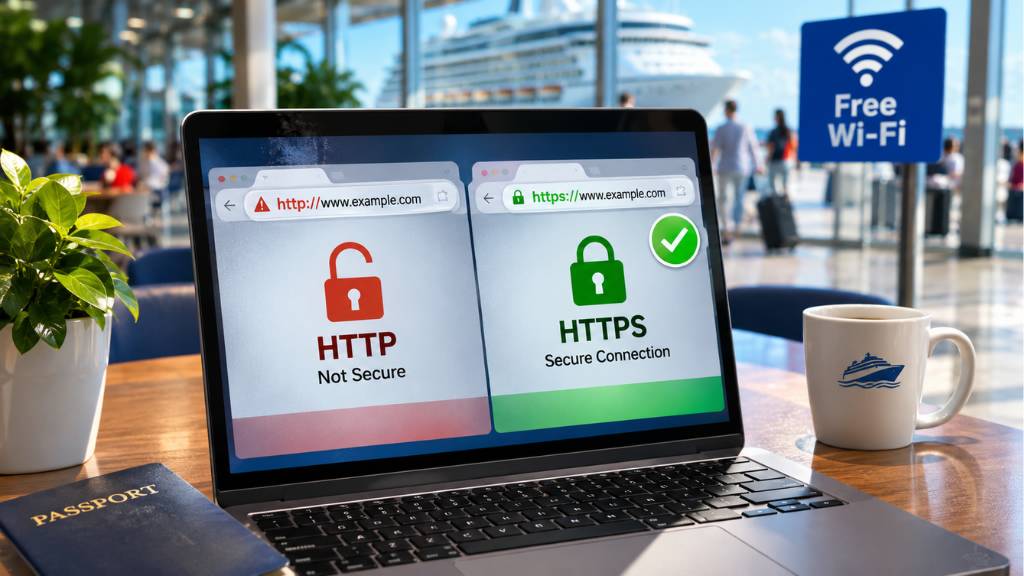
Another concern is data interception. Public Wi-Fi networks can expose users to certain forms of eavesdropping, particularly when network security is weak or websites and applications aren’t properly encrypted.
This doesn’t mean someone automatically gets access to everything on your phone when you connect.
Modern websites generally use HTTPS encryption, and many popular apps encrypt their communications as well. That makes stealing passwords and reading private messages considerably harder.
However, poorly secured connections, malicious hotspots, and unsafe websites can still create opportunities for attackers.
On embarkation day, you might use public Wi-Fi to:
- Check your email.
- Log into your airline account.
- Review hotel reservations.
- Access travel documents.
- Check your bank or credit card balance.
- Send personal information to family members.
These activities can involve information you wouldn’t want falling into the wrong hands.
How to protect yourself:
- Check that websites use HTTPS before entering personal information.
- Avoid websites that display security warnings.
- Use your mobile data connection for banking and other sensitive transactions.
- Keep apps and operating systems updated.
- Consider using a reputable VPN on unfamiliar public networks.
A VPN encrypts traffic between your device and the VPN provider, helping protect it from people monitoring the local Wi-Fi network. However, it doesn’t make phishing websites safe or protect you from every online threat.
3. Fake Login Pages Can Steal Your Passwords
A third danger involves phishing attacks. Some malicious Wi-Fi networks redirect users to login pages that look legitimate. These pages may imitate a cruise line, hotel, airline, or payment service.
You might see a familiar-looking page asking you to enter your email address and password before accessing the internet. The problem is that the page may be controlled by someone attempting to collect your login information.
This is particularly concerning on embarkation day because cruisers often access several travel-related accounts in a short period. You might be checking your cruise reservation, airline booking, hotel confirmation, or email account while waiting to board.
If you enter your credentials into a fraudulent page, someone could attempt to use them to access your accounts. The danger becomes even greater if you reuse the same password across multiple websites.
For example, if you use the same password for your email and an online shopping account, compromising one account could put the other at risk.
How to protect yourself:
- Never enter your cruise line password into a page you reached through an unfamiliar Wi-Fi connection.
- Use a password manager to help identify legitimate website addresses.
- Enable two-factor authentication on important accounts.
- Use unique passwords for your email, banking, airline, and cruise accounts.
- Be suspicious of unexpected requests for payment information.
One important distinction: A legitimate public Wi-Fi network may use a captive portal that asks you to accept terms or provide an email address.
That isn’t automatically a scam. However, you should verify the network and avoid entering your regular account passwords into unfamiliar login pages.
4. Your Phone or Laptop May Become More Exposed to Other Devices
Public Wi-Fi can also create unnecessary exposure between connected devices.
Depending on the network configuration and your device settings, other users on the same network may be able to discover your device or attempt to communicate with it.
This doesn’t mean every person connected to the terminal Wi-Fi can automatically access your photos, messages, or files.
Modern devices have security protections that make unauthorized access much harder. Still, leaving unnecessary sharing and discovery features enabled can increase your exposure.
Think about how many devices might be connected around a busy cruise terminal. Hundreds of passengers could be using phones, tablets, and laptops at the same time. You have no idea who is connected or what their intentions might be.
How to protect yourself:
- Set your network profile to Public on Windows devices.
- Disable file and printer sharing when using public networks.
- Turn off AirDrop or nearby sharing when you don’t need it.
- Disable Bluetooth when it isn’t being used.
- Keep your device firewall enabled.
- Install operating system and security updates before your cruise.
For most cruisers, the easiest solution is to avoid unnecessary device connections and keep sharing features turned off while using unfamiliar networks.
5. Automatic Wi-Fi Connections Can Put You at Risk Without You Noticing
This is one of the easiest dangers to overlook. Many smartphones remember previously used Wi-Fi networks and automatically reconnect when they detect a familiar network name.
That feature is convenient at home, at work, or at a trusted hotel. However, it can create problems when you’re traveling.
Imagine that you previously connected to a network called “Free Airport Wi-Fi.” A malicious hotspot using the same network name could potentially trick your device into attempting to reconnect.
This is particularly relevant when traveling between airports, hotels, cruise terminals, and busy port areas. You may not even notice which network your phone has joined.
Automatic connections can also cause your phone to switch away from a more secure connection without you realizing it.
How to protect yourself:
- Disable automatic Wi-Fi connections for unfamiliar networks.
- Remove old public Wi-Fi networks you no longer need.
- Turn off Wi-Fi when traveling between locations.
- Check your connected network before entering personal information.
- Prefer your own mobile hotspot when practical.
I would rather spend a few extra seconds selecting a trusted network than let my phone connect automatically to whatever happens to be available.
Is Cruise Port Wi-Fi Safe Enough to Use?
Not all cruise port Wi-Fi is dangerous. Many ports and nearby businesses provide legitimate public internet access.
The important distinction is that a legitimate network isn’t necessarily private, and a familiar network name doesn’t guarantee that you’re connecting to the right provider.
Internet Options on Embarkation Day: Which Is Safest?
| Internet Option | Security Considerations | Our Recommendation |
|---|---|---|
| Verified Cruise Terminal Wi-Fi | Security depends on the network’s encryption and protection. | Fine for basic browsing. |
| Restaurant or Café Wi-Fi | Security and privacy protections can vary. | Use cautiously. |
| Unfamiliar Free Wi-Fi | Network ownership and security may be unclear. | Avoid if possible. |
| Personal Mobile Data | Uses your mobile carrier’s connection. | Best for sensitive activities. |
| Personal Mobile Hotspot | Shares your own mobile connection with other devices. | A good alternative. |
| Reputable VPN on Public Wi-Fi | Adds an extra layer of encryption to your internet traffic. | Helpful for added protection. |
My preferred approach is to use mobile data for sensitive activities and save public Wi-Fi for basic browsing when necessary.
If you’re traveling internationally, check your carrier’s roaming rates before relying on mobile data. An expensive roaming bill isn’t a great way to start a cruise vacation either.
Should You Use a VPN at a Cruise Port?
A VPN, or Virtual Private Network, creates an encrypted connection between your device and a VPN provider. This can make it harder for other people on the same public Wi-Fi network to monitor your internet traffic.
For cruisers, a VPN can be useful when connecting through:
- Cruise terminal Wi-Fi.
- Airport wireless networks.
- Hotel internet connections.
- Restaurant and cafe hotspots.
- Other unfamiliar public networks.
However, a VPN isn’t a complete security solution. It doesn’t automatically protect you from fake login pages, phishing emails, malicious downloads, or websites designed to steal your information.
You also need to choose a reputable VPN provider rather than downloading an unfamiliar free VPN application.
Is a VPN worth using before a cruise?
I think it’s a sensible extra layer of protection for people who frequently travel and use public Wi-Fi. It’s not something you should rely on instead of basic security precautions.
What Should You Do Before Boarding Your Cruise Ship?
Embarkation day is not the ideal time to discover that your phone is missing updates, your passwords are outdated, or your mobile data plan doesn’t work internationally. A little preparation can make a big difference.
Here’s a simple pre-cruise internet security checklist.
- Update your phone, tablet, and laptop software.
- Enable two-factor authentication on important accounts.
- Use unique passwords for important websites.
- Download your cruise documents and boarding information.
- Save hotel and airline confirmations for offline access.
- Turn off automatic connections to unfamiliar Wi-Fi networks.
- Disable unnecessary file-sharing features.
- Check your international roaming options.
- Consider installing a reputable VPN before departure.
- Avoid accessing sensitive accounts through unfamiliar public networks.
One particularly useful tip is to download your boarding documents and important travel confirmations before leaving home.
That way, you won’t have to depend on port Wi-Fi just to access information you need to board.
What If You Already Connected to Unsafe Cruise Port Wi-Fi?
If you’ve already connected to a suspicious network, don’t panic. Simply connecting doesn’t automatically mean your device has been hacked or your personal information has been stolen.
What matters is what you did while connected and whether you entered sensitive information. Here are some sensible steps to take.
1. Disconnect from the network.
Turn off Wi-Fi or forget the suspicious network so your device doesn’t reconnect automatically.
2. Check your important accounts.
Look for unfamiliar login notifications, password-reset requests, or unusual account activity.
3. Change compromised passwords.
If you entered a password on a suspicious login page, change it using the official website or app over a trusted connection. Change it anywhere else you reused the same password.
4. Enable two-factor authentication.
If you haven’t already enabled it, now is a good time to add another layer of protection.
5. Contact your bank if necessary.
If you entered banking details or payment information on a suspicious website, contact your bank or card issuer promptly.
6. Run a security check.
Update your device and use its built-in security features or a reputable security application to check for suspicious activity.
If you notice unfamiliar financial transactions or account access, contact the relevant provider immediately. The important thing is not to assume the worst, but don’t ignore warning signs either.
Who Should Be Most Careful With Cruise Port Wi-Fi?
Although everyone should take basic precautions, some travelers have more reason to be careful.
Business travelers: If you’re accessing company email, confidential documents, or work accounts, avoid unverified public networks. Follow your employer’s security requirements.
Frequent online shoppers: Avoid entering payment information or accessing shopping accounts through unfamiliar hotspots.
International cruisers: If you’re traveling outside your home country, you may be more tempted to rely on free Wi-Fi to avoid roaming charges. Plan your connectivity before departure.
Families traveling with children: Make sure everyone understands that public Wi-Fi isn’t automatically safe. Children may be more likely to connect to familiar-looking free networks without checking them.
Travelers managing finances: Avoid accessing banking, investment, and payment accounts through untrusted public connections.
You don’t need to become a cybersecurity expert before your cruise. A few simple habits can significantly reduce unnecessary risks.
FAQs About Cruise Port Wi-Fi Risks
Is free Wi-Fi at cruise ports safe?
It can be safe for ordinary browsing, provided you’re connecting to a legitimate network. However, public Wi-Fi can have security and privacy weaknesses. Avoid sensitive transactions unless you’re using a trusted connection.
Can someone steal my information through cruise port Wi-Fi?
Potentially, yes. Attackers may use malicious hotspots, phishing pages, or weaknesses in network security to collect information. Modern encryption protects much of your online activity, but it doesn’t eliminate every risk.
Should I use a VPN at a cruise terminal?
A reputable VPN can add protection by encrypting your internet traffic on public networks. It’s particularly useful when traveling between airports, hotels, and cruise ports.
Is cruise terminal Wi-Fi safer than restaurant Wi-Fi?
Not necessarily. A terminal may have professionally managed internet access, but you should still verify the official network. Security depends on how the network is configured and maintained, not simply where it’s located.
Can hackers access my phone just because I connect to public Wi-Fi?
Not automatically. Connecting to a public network doesn’t give someone unrestricted access to your phone. However, insecure network settings, outdated software, and unnecessary sharing features can increase exposure.
Should I turn off Wi-Fi when boarding a cruise ship?
You don’t necessarily need to keep Wi-Fi turned off all day. However, disabling automatic connections and connecting only to verified networks is a sensible precaution.
Is mobile data safer than public Wi-Fi?
For sensitive activities, mobile data is generally a better option because it avoids the shared local Wi-Fi network. You should still use secure websites, updated apps, and strong passwords.
Can I use public Wi-Fi to check my cruise reservation?
Yes, but be careful about the network you use. Ideally, access your reservation through the official cruise line app or website using a trusted connection. Download important documents beforehand so you don’t have to depend on public internet access.
Is free Wi-Fi at a cruise port better than buying an internet package onboard?
That depends on what you need. Port Wi-Fi may be sufficient for basic browsing while waiting to board, but it won’t provide continuous internet access once your ship leaves port. If you need reliable connectivity throughout the sailing, compare the onboard internet options before purchasing.
Should I connect to Wi-Fi automatically when traveling?
I recommend disabling automatic connections to unfamiliar public networks. It gives you more control over which network your device uses and reduces the chance of connecting to a suspicious hotspot.
Jim’s Take: Cruise Port Wifi Risks

Don’t Let Free Wi-Fi Create an Expensive Cruise Problem.
My view is that most cruisers don’t need complicated cybersecurity arrangements. A few sensible habits will go a long way.
I’d download my boarding documents before leaving home, use mobile data for anything sensitive, and avoid connecting to Wi-Fi networks I couldn’t verify.
If I needed public internet, I’d consider using a reputable VPN and keep my phone’s automatic connection settings under control.
The biggest takeaway is this: Free Wi-Fi isn’t always worth the risk, especially when you have personal information, financial accounts, and important travel documents on the line.
Final Verdict: Cruise Port Wifi Risks
Don’t let the convenience of free cruise port Wi-Fi override basic internet safety.
Verify the network before connecting, avoid entering sensitive information on unfamiliar login pages, keep your devices updated, and use mobile data when handling important accounts.
Most importantly, prepare before embarkation day. Download your travel documents, check your roaming options, and make sure your essential information is available offline.
That way, you can spend less time worrying about internet connections and more time enjoying the cruise you’ve been looking forward to.